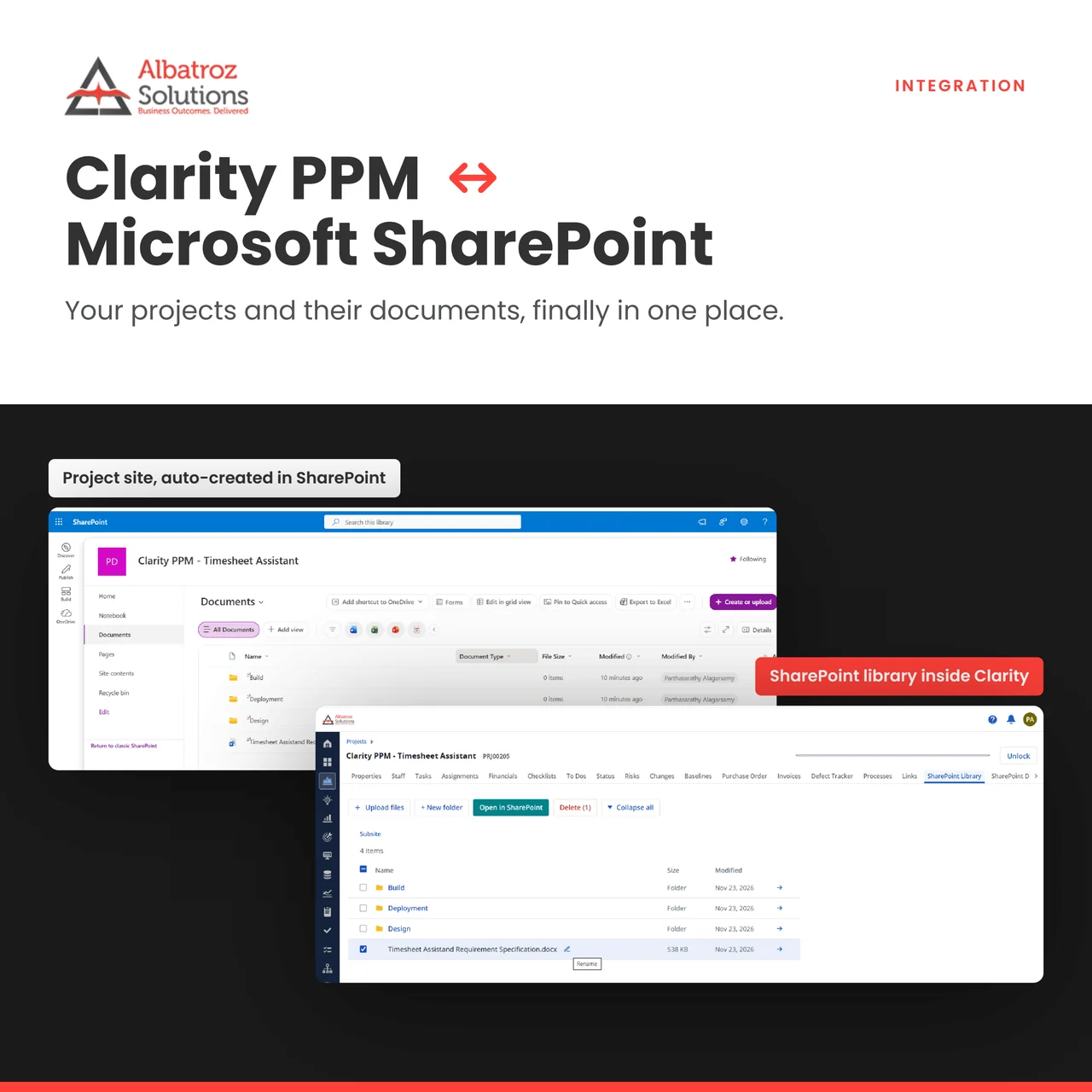
Clarity PPM + Microsoft SharePoint Integration
Connect Clarity PPM projects to Microsoft SharePoint with native GEL workflows - auto-create sites, sync access, manage files inside Clarity, and track document status.
An Albatroz Solutions accelerator for Broadcom Clarity PPM that connects Clarity projects to Microsoft SharePoint using native GEL scripts and workflows - so your projects and their documents finally live in one place.
The Challenge
Most organizations run their projects in Clarity PPM and keep the project documents in Microsoft SharePoint. The two rarely talk to each other. Someone must set up a SharePoint site for every new project, folder structures vary from team to team, and access is updated by hand whenever people join or leave. Project managers and the PMO also can't see from Clarity which documents exist or whether they have been approved.
The result is slower project start-ups, uneven governance, and access that drifts out of date.
What the Integration Does
Every Clarity project gets its own SharePoint site, kept aligned automatically.
01 - A project site, created automatically
As soon as a project is created in Clarity, a dedicated SharePoint site is set up with your standard folder structure and linked back to the project. Teams can start uploading on day one.
02 - Access that follows the project team
Clarity roles (Project Manager, Sponsor, team members) decide who can own, edit or view the site. New members get access, leavers lose it, and a change of Project Manager or Sponsor is applied automatically.
03 - SharePoint, right inside Clarity
Browse, open, upload, rename and organize project files without leaving Clarity. Users sign in with their Microsoft work account, existing permissions are respected, and changes sync instantly in both directions.
04 - Document status visible in Clarity
Project documents, with document type, approval status, author and last update, are brought into Clarity to be tracked and reported alongside the rest of the project.
Use Cases
How organizations put the integration to work, every day.
01 - Day-one project workspace
Situation: The PMO approves a new project, and the team needs somewhere to store documents straight away.
With the integration: A SharePoint site is created automatically with the organization's standard folders (for example Design, Build, Deployment). No IT ticket, no waiting.
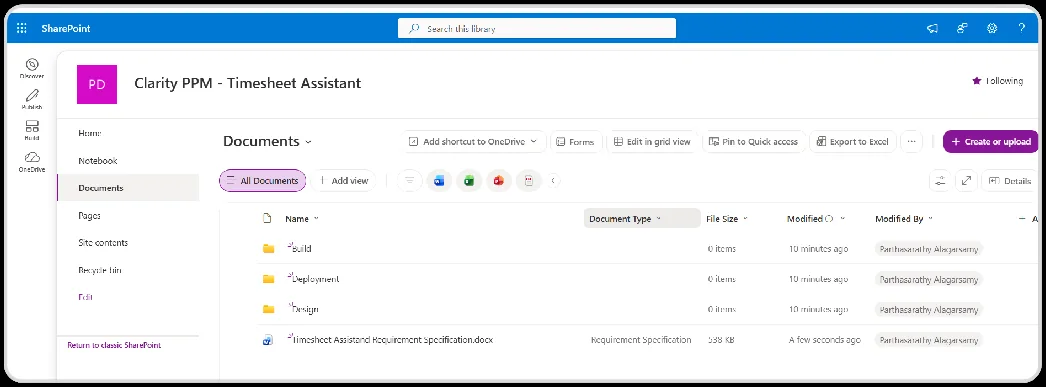
Auto-created project site in SharePoint, with standard folders, approval status and document type
02 - Team changes without access headaches
Situation: A consultant rolls off a project, and a new Project Manager takes over.
With the integration: Updating the team in Clarity is enough. The consultant loses access, the new PM becomes a site owner, and anyone who still needs access through another role keeps it.

David is added as Manager in the Clarity project
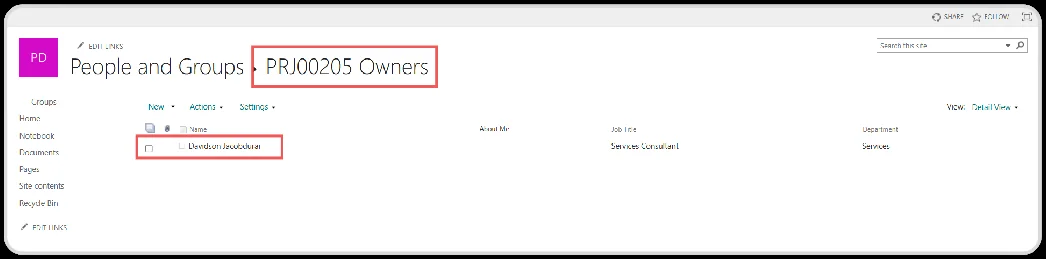
David gets site owner access automatically
03 - Managing files without leaving Clarity
Situation: A Project Manager is updating the project in Clarity and needs to upload the latest status report.
With the integration: The SharePoint Library tab lets them upload, open, rename and organise files right inside the project. Changes show in SharePoint instantly.
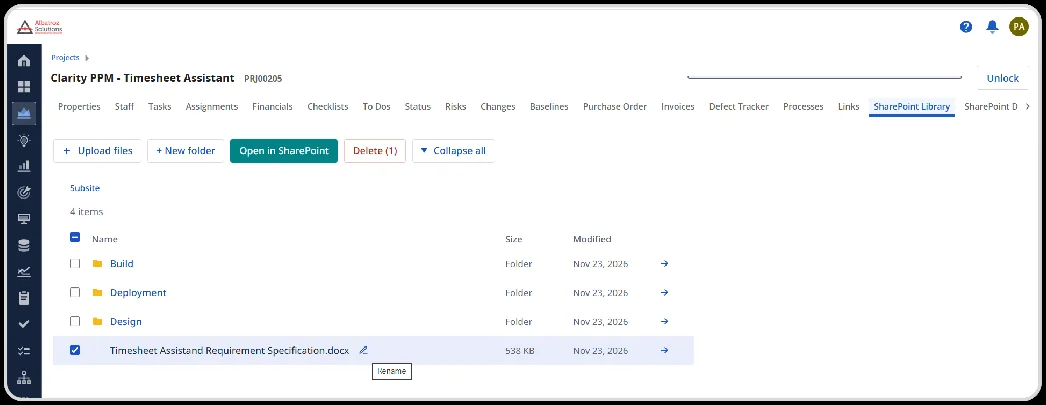
SharePoint Library tab inside a Clarity project
04 - Stage-gate reviews with document evidence
Situation: Before a gate review, the PMO must confirm the Project Charter or design document is approved.
With the integration: Document type and approval status are visible in Clarity, so reviewers check readiness in one place instead of chasing emails.
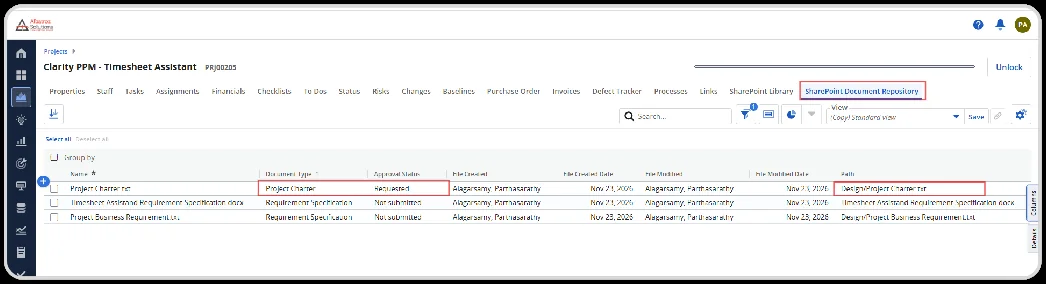
Document type and approval status in the Clarity PPM document repository
05 - Audit and compliance readiness
Situation: In regulated industries such as pharma or banking, auditors ask who created and changed key project documents.
With the integration: Every project follows the same structure, access mirrors the project team, and author, editor and dates for each document are recorded in Clarity.
06 - Portfolio-level document visibility
Situation: Leadership wants to know which projects are missing approved key documents.
With the integration: Document data sits in Clarity alongside schedule, cost and resources, ready for portfolio reports and dashboards.
The Value for Your Organization
- Faster project start-up - No waiting for IT to create sites or folders. The workspace is ready the moment the project is approved.
- Consistent governance - Every project follows the same document structure, so files are easy to find and audits are simpler.
- Stronger security and compliance - Access is driven by the Clarity project team, and leavers are removed without manual follow-up.
- Higher productivity - Teams work from one place instead of switching between tools and hunting for links.
- Better visibility for leadership - Document and approval status sit in Clarity reports and dashboards next to schedule, cost and resource data.
- A foundation for automation - Build processes on document data, e.g. move a project to its next stage once its Project Charter is approved.
Built Using Clarity Framework - Shaped Around How You Work
Built entirely with Clarity's native GEL scripting and workflows, the integration runs inside your Clarity environment, follows Clarity's own process framework, and is maintained like any other Clarity process. That makes it easy to adapt:
- Folder templates - Define the standard folders every project site starts with.
- Access rules - Map Clarity roles to SharePoint Owners, Members or Visitors via an admin-maintained mapping.
- Document metadata - Choose which SharePoint columns, such as Document Type or Approval Status, flow into Clarity fields.
- Schedule - Run synchronization on demand or on a schedule that suits your operations.
- Next steps - Extend the scripts with new automations and approval-driven workflows as your PMO matures.
Open GEL, not a closed connector: changes are made quickly by your Clarity team or Albatroz, without waiting on a vendor roadmap.
Why Albatroz
Albatroz Solutions is a Broadcom Tier-1 Expert Advantage Partner specializing in Clarity PPM and Rally, with deep, hands-on Clarity implementation experience across BFSI, pharma and life sciences, manufacturing and retail. We implement, configure and tailor this integration to your environment, and support it after go-live.
Ready to connect Clarity and SharePoint? Contact Albatroz Solutions for a walkthrough of the integration in action at albatrozsolutions.com.
Contact us:
For questions about Clarity SharePoint integration or our PPM services, contact us at info@albatrozsolutions.com.